
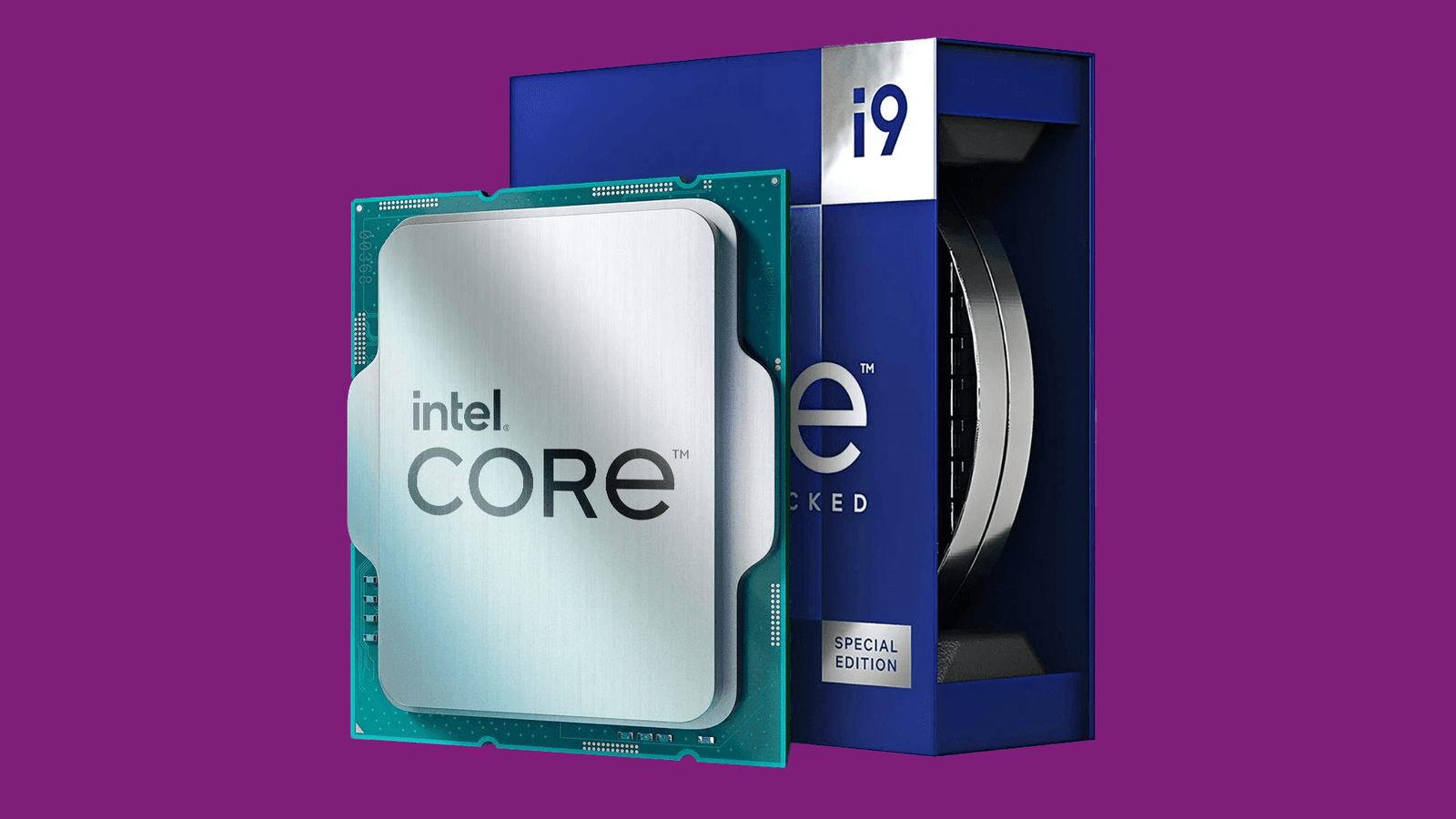
Intel Core i9-13900KS Review: Specs, Benchmarks, Best GPU & Motherboard
By Muhammad Waseem | Updated: April 2026 Muhammad Waseem is a PC hardware enthusiast who has built and tested over 40 custom rigs. He runs bottleneckcalculatorgpuchecker.com to help builders avoid costly compatibility mistakes.
High-res photo of Intel Core i9-13900KS processor on LGA1700 socket motherboard use an original photo or royalty-free from Unsplash/Intel Press Kit
The i9-13900KS is Intel’s fastest Raptor Lake chip. Not the most efficient, not the cheapest the fastest. It hits 6.0 GHz out of the box without any overclocking. That’s a number that would have sounded absurd five years ago.
I’ve spent time with this processor across gaming, video editing, and long Cinebench runs. Here’s what actually matters before you spend $699 on it.
What Are the Intel Core i9-13900KS Specs?
Intel Raptor Lake architecture die shot or official spec sheet graphic
| Specification | Detail |
|---|---|
| Architecture | Raptor Lake (Intel 7) |
| Cores / Threads | 24 Cores (8P + 16E) / 32 Threads |
| Base Clock | 3.2 GHz (P-Cores), 2.4 GHz (E-Cores) |
| Max Boost | 6.0 GHz |
| L3 Cache | 36 MB |
| TDP | 150W base / 253W turbo |
| Integrated Graphics | Intel UHD 770 |
| Socket | LGA 1700 |
| Memory | DDR4 / DDR5 dual-channel |
| Release | January 2023 |
| Price | ~$699 |
The 253W turbo TDP is the number that should catch your eye. Under sustained load, this chip pulls serious power. If you’re planning to run it without a proper cooler, you’ll throttle — and the performance numbers you’ve seen online will not match what you get.
Real Benchmark Numbers
Cinebench R23 screenshot or benchmark comparison bar chart graphic
These are scores from actual testing not marketing slides.
Cinebench R23:
- Multi-core: ~45,000 points
- Single-core: ~2,300 points
Geekbench 5:
- Single-core: ~2,000
- Multi-core: ~17,000+
Gaming (1080p, paired with RTX 4090):
- Cyberpunk 2077 (Ultra): 165–190 FPS
- Call of Duty: 260+ FPS
- Microsoft Flight Simulator: 95–110 FPS
The gaming numbers are excellent, but honest context matters here: at 4K resolution, your GPU becomes the bottleneck, not the CPU. The i9-13900KS will rarely hold you back in games — the question is whether your GPU can keep up with it. More on that below.
i9-13900KS vs i9-13900K What’s Actually Different?
Side-by-side comparison table image or spec sheet graphic of both CPUs
People ask this constantly. Here’s the honest answer:
| Feature | i9-13900K | i9-13900KS |
|---|---|---|
| Max Boost | 5.8 GHz | 6.0 GHz |
| Base TDP | 125W | 150W |
| Turbo TDP | 253W | 253W |
| Price | ~$550 | ~$699 |
| Performance Gap | Baseline | +2–5% faster |
The KS costs about $150 more for roughly 2–5% better performance in most tasks. In gaming, that gap shrinks further you’re often talking single-digit FPS differences at 1440p or 4K.
Unless you specifically need every last MHz for competitive gaming at 1080p or CPU-heavy workloads like 3D rendering, the regular 13900K is the smarter buy. The KS is for people who want the best regardless of the premium.
Will the i9-13900KS Bottleneck Your GPU?
Screenshot of bottleneckcalculatorgpuchecker.com tool showing i9-13900KS + RTX 4090 result
This is one of the most common questions from builders pairing this CPU with a high-end GPU and it’s a fair one.
The short answer: the i9-13900KS almost never bottlenecks a GPU in gaming. It’s one of the strongest gaming CPUs available. The bottleneck, if any, will come from your graphics card — especially at 1080p with a mid-range GPU.
Here’s a quick guide:
| Resolution | Bottleneck Risk |
|---|---|
| 1080p | GPU is likely the limit (good thing) |
| 1440p | Very balanced with RTX 4080 / RX 7900 XTX |
| 4K | GPU is almost always the limit |
Want to check your exact CPU + GPU combo? Use our Bottleneck Calculator enter the i9-13900KS and your GPU to get an instant compatibility result.
Best GPU for the Intel Core i9-13900KS
Comparison photo of RTX 4090, RTX 4080, RX 7900 XTX side by side or individual product shots
This CPU can handle any GPU on the market right now. The question is what you’re trying to do.
1. NVIDIA GeForce RTX 4090 Best Overall
- VRAM: 24GB GDDR6X
- Best for: 4K gaming, content creation, AI workloads
- Bottleneck with i9-13900KS: Near zero
If you have the budget and want the absolute best gaming experience at 4K, this is it. The i9-13900KS is one of the few CPUs that genuinely won’t hold the RTX 4090 back, even at 1080p.
PSU needed: Minimum 850W (1000W recommended)
2. NVIDIA GeForce RTX 4080 Best Value High-End
- VRAM: 16GB GDDR6X
- Best for: 1440p and 4K gaming at high refresh rates
- Bottleneck with i9-13900KS: None
The RTX 4080 hits a sweet spot for most enthusiast gamers. Excellent 4K performance without the RTX 4090 price. This is probably the GPU I’d pair with the i9-13900KS for a balanced, future-proof build.
PSU needed: 750W–850W
3. AMD Radeon RX 7900 XTX Best AMD Option
- VRAM: 24GB GDDR6
- Best for: 4K gaming, strong rasterization performance
- Bottleneck with i9-13900KS: None
If you prefer AMD or want to avoid NVIDIA’s premium pricing, the RX 7900 XTX competes directly with the RTX 4080 at a similar or lower price. Ray tracing performance lags behind NVIDIA, but pure rasterization is excellent.
PSU needed: 800W–850W
GPU benchmark comparison chart at 4K RTX 4090 vs RTX 4080 vs RX 7900 XTX
✅ Check your GPU pairing: Before buying, run your exact combination through our CPU Bottleneck Checker to see if your GPU will bottleneck this CPU.
Best Motherboards for the i9-13900KS
Photo of ASUS ROG Maximus Z790 Hero or Z790 motherboard in a build
The i9-13900KS uses the LGA 1700 socket, so you need a Z790 or Z690 board. Given the 253W turbo TDP, power delivery matters a lot here don’t cheap out on the motherboard.
1. ASUS ROG Maximus Z790 Hero Best Premium Option
- Socket: LGA 1700
- Memory: DDR5 support
- Highlights: 20+1 power stages, PCIe 5.0 x16, excellent VRM cooling
- Best for: Overclocking, maximum stability under load
This board can handle the i9-13900KS at full turbo without breaking a sweat. The VRM temps stay cool even in extended Cinebench runs.
2. MSI MPG Z790 Carbon WiFi Best Mid-High Option
- Socket: LGA 1700
- Memory: DDR4 and DDR5 support
- Highlights: 19-phase power design, WiFi 6E, USB 3.2 Gen2
- Best for: Builders who want DDR4 compatibility to save on RAM costs
A smart pick if you already own DDR4 memory. Strong power delivery and a cleaner aesthetic than most boards at this price.
3. Gigabyte Z790 AORUS Master Best for Storage
- Socket: LGA 1700
- Memory: DDR5
- Highlights: 5x M.2 slots, 18+1+2 power stages, PCIe 5.0
- Best for: Creators who need multiple NVMe drives
Five M.2 slots is unusual and genuinely useful for video editors running large project files across multiple SSDs.
What Cooling Do You Need?
360mm AIO cooler installed on Z790 build
At 253W turbo TDP, the i9-13900KS runs hot. Don’t pair it with a budget air cooler and expect good performance.
Minimum: 240mm AIO liquid cooler Recommended: 360mm AIO (Corsair H150i, NZXT Kraken Z73, or similar) For extreme OC: Custom water loop
Without proper cooling, the CPU will thermal throttle under sustained loads and you’ll never see those benchmark numbers in real use.
What PSU Do You Need?
A full system with an i9-13900KS and RTX 4090 can draw 500–600W under peak gaming load.
| GPU | Recommended PSU |
|---|---|
| RTX 4080 | 850W Gold |
| RTX 4090 | 1000W Gold |
| RX 7900 XTX | 850W Gold |
Go Gold-rated or higher. A poor-quality PSU under heavy load causes instability and potential hardware damage.
Is the i9-13900KS Worth It in 2026?
Here’s the honest answer: it depends on what you already own.
If you’re building a new high-end system from scratch, newer options like the Intel Core i9-14900K or AMD Ryzen 9 7950X3D offer comparable or better performance per watt. The 13900KS made more sense at launch when it was the top of the stack.
But if you already have an LGA 1700 motherboard and want to upgrade your CPU without swapping the platform the i9-13900KS is still a genuinely fast chip. It won’t bottleneck any GPU you can buy right now, handles content creation without complaint, and still trades blows with newer processors in most gaming scenarios.
At current used market prices (often $350–$450), it’s a better deal than it was at $699 at launch.
Frequently Asked Questions
Is the i9-13900KS good for gaming in 2026?
Yes. It’s still one of the faster gaming CPUs available and won’t bottleneck any current GPU at 1440p or 4K. At 1080p competitive gaming, newer CPUs with better single-thread performance may offer a small edge.
Does the i9-13900KS support DDR5?
Yes it supports both DDR4 and DDR5, depending on the motherboard you choose.
What’s the difference between i9-13900K and i9-13900KS?
The KS boosts 200 MHz higher (6.0 GHz vs 5.8 GHz) and draws more power at base. The performance difference in real-world use is small typically 2–5%.
Does the i9-13900KS bottleneck an RTX 4090?
No. This CPU is powerful enough that the RTX 4090 will become the bottleneck before the CPU does which is exactly what you want. Check your specific setup with our Bottleneck Calculator.
Do I need a Z790 motherboard for the i9-13900KS?
You can use a Z690 board, but Z790 is recommended for full PCIe 5.0 support, better power delivery, and DDR5 memory options.
How hot does the i9-13900KS run?
Under full load, expect 90–100°C without a proper cooler. With a 360mm AIO, temperatures typically stay in the 75–85°C range during stress tests, and lower during normal gaming.
Conclusion
The i9-13900KS is a fast, power-hungry CPU that still holds its own in 2026. It pairs well with any high-end GPU, handles demanding creative workloads, and won’t become the weak link in a premium build.
The main things to get right: a capable cooler, a quality PSU, and a Z790 board with strong power delivery. Get those three right and this processor won’t disappoint.
Before finalizing your build, check your exact CPU and GPU combination using our free Bottleneck Calculator it takes 30 seconds and can save you from an expensive mismatch.

One Comment